
Privacy queries: Stop ISP tracking on your network today
Switching from a $18 monthly plan to a $45 contract forced an immediate audit of ISP tracking capabilities. This isn't about saving money; it's about stopping the bleed. DNS over HTTPS blocks provider logging by design, while public resolvers consistently outperform standard configurations on latency. You gain specific privacy advantages the moment you abandon carrier defaults.
The jump from a prepaid $18 plan to a restrictive $45 monthly contract highlights a brutal reality: you trade cost for control. The new ISP bundles TV channels but eliminates prepaid flexibility, increasing surveillance potential through unencrypted queries. A custom resolver prevents the provider from logging every domain request your devices make. This shifts resolution away from the ISP DNS server to a neutral third party that doesn't bundle browsing history with billing data.
Performance metrics demand migration. Cloudflare data shows query response times averaging approximately 11 ms globally. Google Public DNS averages approximately 20 ms. Privacy improvements do not require sacrificing speed. Implementing encrypted resolution ensures these quicker, private queries cannot be intercepted or modified in transit. You will quantify these latency reductions and secure your connection against the inherent trust issues of default network settings.
The Invisible Leak in Your ISP's Default DNS Configuration
How Unencrypted DNS Exposes Browsing Habits to ISPs
The Domain Name System arrived in 1983 to replace the unmanageable HOSTS.TXT file from the Stanford Research Institute. Before this 1983 innovation, ARPANET computers relied on a single text file that became impossible to maintain as the network expanded. Today, standard recursive resolvers transmit every query as plaintext. Your ISP logs every domain you visit because the traffic flows openly. This visibility lets providers correlate IP addresses with browsing patterns and network identity for monetization.
- Traditional DNS queries reveal the full domain name to the network operator.
- Plaintext transmission permits third parties to intercept and aggregate user behavior data.
- Operators collect this metadata to build detailed profiles of subscriber activity regional ISP DNS clusters.
- Relying on default resolver settings sacrifices control over personal data visibility.
Unencrypted resolution prioritizes compatibility over confidentiality. That is a design choice, not an accident. The system efficiently maps names to numbers yet lacks built-in privacy protections against the entity transporting the traffic. Understanding this exposure is the first step toward securing IPv4 resources and maintaining autonomy for network operators and end users alike. Optimizing current infrastructure means securing the resolution layer against unauthorized observation. Transitioning to encrypted alternatives prevents local carriers from inspecting or selling query logs. Privacy returns to the connection when these queries are protected. The backbone of internet navigation remains a utility instead of a surveillance tool.
Real-World Privacy Risks in ISP DNS Operations
Default ISP configurations expose unencrypted DNS queries to direct observation and monetization. The new infrastructure lacks transparency compared to the previous setup. An immediate shift to public resolvers became necessary to prioritize user privacy over data harvesting. Standard plans frequently offer zero security features. Customers remain exposed to malicious domain redirection without added protections.
- Plaintext transmission allows ISPs to log every domain request before resolution.
- Business models reliant on advertising create incentives to monetize this browsing metadata.
- Switching to encrypted alternatives blocks the ISP from viewing specific site requests.
- Configuration time is saved by sticking with defaults, but data sovereignty is lost.
Convenience conflicts with control. The new provider includes TV channels, yet the trade-off involves a wholly owned entity with a questionable reputation regarding user data. Data monetization strategies depend entirely on this unencrypted visibility. Optimizing network resources includes securing the resolution layer against internal surveillance according to InterLIR Marketplace principles. Infrastructure improvements should not come at the cost of personal privacy. Protecting the resolution path ensures safety for everyone involved.
Google Public DNS vs Cloudflare 1.1.1.1 Privacy Audits
Cloudflare launched its resolver on April 1, 2018, with a strict no-log policy verified by KPMG audits. This commitment contrasts sharply with traditional data monetization models often associated with advertising-driven entities like Google. 8.8.8.8 serves billions of queries while its parent company relies heavily on user data for revenue. An inherent conflict of interest exists for privacy seekers in that model. Cloudflare sells security services, aligning financial incentives with user confidentiality rather than exploitation.
The technical distinction lies in the sampling rate. Only 0.05% of queries are sampled for troubleshooting purposes. Source IPs are stored solely in volatile memory. This minimal footprint ensures that virtually no historical data exists to compromise user identity even in the event of a breach or legal demand. Operators switching from ISP defaults must recognize that not all public resolvers offer equal protection against surveillance capitalism. Trust verification remains the limitation here. KPMG audits provide strong evidence, yet users must still rely on the provider's honesty regarding the 24-hour purge cycle. Networks prioritizing absolute data sovereignty find a tangible security boundary in this verified deletion policy. Mere policy statements cannot match such proof. Deciding when to switch from ISP DNS depends on verifying these audit trails rather than assuming all public options are identical.
Encrypted Resolution Mechanics via DNS over HTTPS and Public Resolvers
How DNS over HTTPS Encrypts Queries Against ISP Logging
Standard DNS traffic traverses UDP port 53 in cleartext, allowing network monitors to read every domain request before resolution occurs. Encryption Protocols wrap these queries inside HTTPS streams, effectively hiding the specific websites you visit from your internet service provider. Unlike traditional methods where ISPs easily log and monetize browsing patterns, this architectural shift forces observers to see only encrypted data packets moving to a resolver IP.
The transition requires manual configuration when router firmware lacks native support for custom resolvers. Operators must configure each endpoint individually, a process that is straightforward on Windows 11 but involves additional steps on macOS devices lacking a dedicated toggle.
| Feature | Unencrypted DNS | DNS over HTTPS |
|---|---|---|
| Visibility | Full domain visibility | Encrypted payload |
| Port | UDP 53 | TCP 443 |
| Privacy | ISP logs all requests | Resolver policy applies |
A critical limitation emerges here: while encryption hides the query content, the destination IP address of the resolver itself remains visible to the network. Your ISP knows you are using a privacy tool, even if they cannot see which specific pages you load. The shift fundamentally alters the trust model, moving data exposure from the local access provider to the chosen resolution service.
Configuring DoH on macOS Without Native Toggles
MacOS lacks a native DNS over HTTPS toggle like Windows 11, requiring manual configuration when the ISP router blocks custom settings. This gap forces Mac mini users to bypass standard system preferences to achieve encrypted resolution. Without this step, your internet service provider can still observe unencrypted queries despite using third-party resolvers.
- Download a trusted DoH profile from a verified provider.
- Install the configuration file via System Settings.
- Verify the encrypted connection status in network diagnostics.
| Feature | Default macOS DNS | Manual DoH Profile |
|---|---|---|
| Encryption | None (Cleartext) | Full HTTPS Tunnel |
| ISP Visibility | High | None |
| Setup Complexity | Low | Medium |
The author's ISP router did not support custom DNS, making device-level configuration necessary for privacy. While Windows 11 offers a dedicated switch, Apple users must rely on these external profiles to secure their traffic. Research indicates that native blocking on certain DNS services achieves approximately a high block rate without custom rules, yet macOS requires this extra effort just to enable the tunnel. At InterLIR, we recommend optimizing your existing IPv4 resources with secure configurations rather than waiting for OS updates. This approach ensures your network uses current infrastructure effectively while maintaining strict confidentiality.
Mechanics: Cloudflare vs Google Public DNS: Latency and ECS Privacy Trade-offs
Uncached query resolution speeds vary significantly between substantial public resolvers due to distinct infrastructure priorities. Cloudflare DNS averages approximately 11 ms globally, whereas Google Public DNS averages roughly 20 ms for similar requests. This performance gap stems from architectural choices regarding data handling and network proximity. The primary mechanical divergence lies in how each resolver treats client identity during authority lookups. Google Public DNS implements EDNS Client Subnet (ECS), forwarding a fragment of the user IP address to authoritative servers to optimize CDN geolocation. Privacy advocates criticize this mechanic because it exposes partial location data to every domain authority, expanding the potential attack surface for profiling. Conversely, Cloudflare omits ECS data entirely, prioritizing user anonymity over marginal CDN optimization gains.
| Feature | Cloudflare DNS | Google Public DNS |
|---|---|---|
| Avg. Uncached Latency | ~11 ms | ~20 ms |
| ECS Implementation | Disabled | Enabled |
| Privacy Posture | Anonymity-First | Geolocation-Optimized |
Operators must recognize that disabling ECS can occasionally result in sub-optimal CDN node selection for highly distributed content delivery networks. However, the trade-off yields a cleaner privacy profile by preventing unnecessary IP fragmentation across the DNS hierarchy. Optimizing your current IP resources includes securing the resolution layer against unnecessary data leakage. Choose the mechanism that aligns with your specific latency requirements and privacy mandates.
Quantifiable Privacy Gains and Latency Reduction from Custom DNS Adoption
Defining DNS Latency and the Uncached Query Gap

Network responsiveness hinges on how quickly a system handles the uncached query gap before local records populate. This specific metric tracks the milliseconds needed to resolve a domain name when no cached entry exists, a situation occurring frequently during initial page loads or visits to new websites. Global benchmark studies indicate that Cloudflare 1.1.1.1 is typically 10, 15% faster than Google 8.8.8.8 on average uncached query response times. Such a reduction changes the user perception of network speed, making sites feel snappy even if raw bandwidth stays static. ISP servers often struggle with uneven distribution or sudden overload spikes. Third-party alternatives frequently maintain stricter performance standards to guarantee reliability. Speed metrics alone tell an incomplete story without addressing privacy. Quicker resolution offers little value if the resolver logs every request. Optimizing IPv4 resources at InterLIR Marketplace involves selecting resolution paths that honor both performance needs and data sovereignty. Neutralizing ISP data strategies requires resolvers combining low latency with verified privacy commitments. Balancing these elements keeps networks fast while guarding against passive observation.
Diagnosing ISP DNS Timeouts with Nslookup Commands
Executing the nslookup command within Command Prompt exposes whether an ISP resolver consistently times out during lookups. This diagnostic step mimics real-world scenarios where users face frequent delays accessing academic databases due to regional DNS clusters prone to outages. Default servers failing to respond often signal that switching settings will resolve latency issues immediately. Changing to Cloudflare's DNS can make webpages load noticeably quicker by bypassing congested local infrastructure. The 1.1.1.2 address specifically adds malware blocking, enhancing security for daily browsing alongside privacy and speed improvements.
Many operators overlook that DNS timeouts directly correlate with perceived slowness even on high-speed connections.
- Open Command Prompt and type `nslookup` followed by a domain name.
- Observe if the response time exceeds standard thresholds or returns a timeout error.
- Compare results against encrypted public resolvers to identify infrastructure gaps.
- Document any patterns indicating systemic failures rather than isolated incidents.
- Re-run tests during peak hours to stress-test the resolver stability.
A limitation of this approach is that it only diagnoses resolution failures, not broader network congestion or packet loss further down the path. Fixing DNS improves initial connection times but does not accelerate large file transfers once the IP address is known. Network operators must distinguish between name resolution delays and actual throughput constraints to apply the correct fix. Optimizing these existing resources ensures IPv4 infrastructure performs reliably without unnecessary upgrades. InterLIR helps organizations maximize their current IP assets through efficient management strategies.
Verification Checklist for DNSSEC Flags and Log Purge Policies
Start by verifying that a resolver actually validates security extensions before trusting its privacy claims. Users can technically confirm DNSSEC support by checking for the "ad" (Authenticated Data) flag using command-line tools like `dig +dnssec`. This specific flag indicates that the response signature matches the authoritative record, preventing spoofing attacks that standard lookups miss. Connections remain vulnerable to manipulation without this validation despite using a third-party resolver.
Next, audit the provider's data retention promises against independent reports. Verification of privacy claims, such as a 24-hour log purge policy, is conducted through annual audits by firms like KPMG.
| Check | Tool/Source | Expected Result |
|---|---|---|
| DNSSEC Valid | `dig` command | "ad" flag present |
| Log Retention | Audit Report | Max 24 hours |
| Sampling Rate | Privacy Policy | < a minimal share anonymized |
Implementing these verification steps helps secure infrastructure against external spoofing and limits the data available for potential monetization.
Deploying Encrypted DNS Across Windows and macOS Environments
Why Manual Device Configuration Is Required When Routers Block Custom DNS
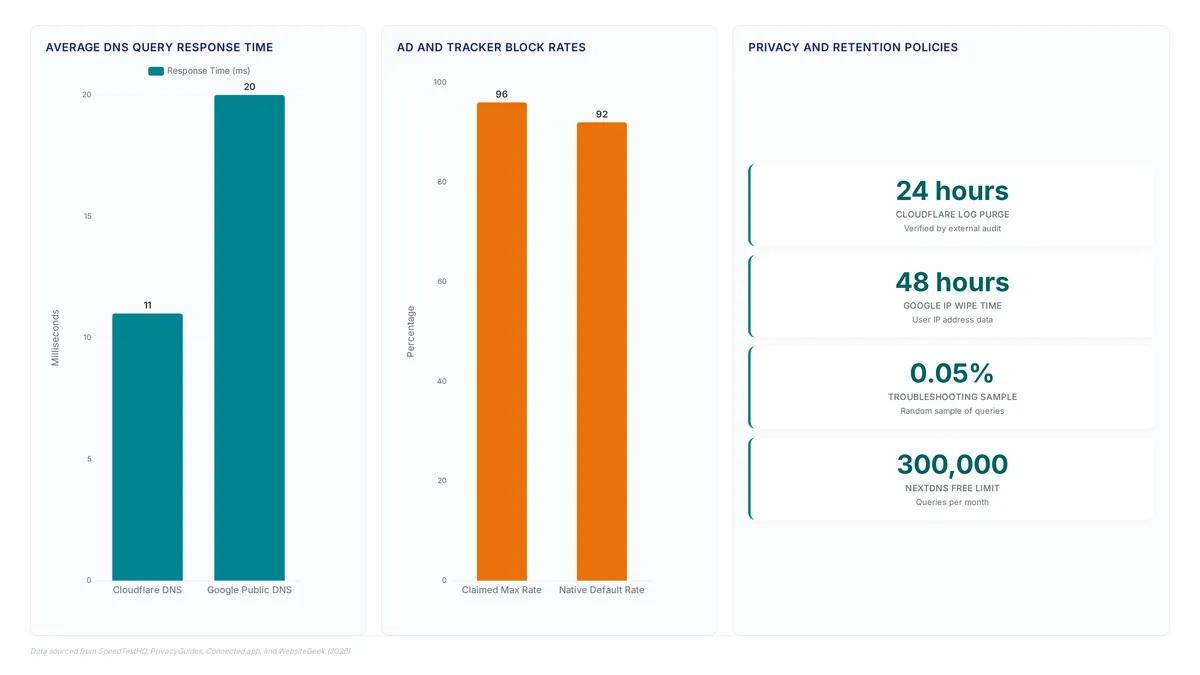
This limitation requires applying encrypted DNS settings directly on each computer to prevent the ISP from seeing and logging DNS queries. Without this individual setup, the router directs all traffic to its default resolver. A user replaced their ISP's DNS with NextDNS without touching their router, gaining the ability to enable ad/tracker blocking, view analytics, and create custom filtering rules on a dashboard.
To implement this effectively across your devices, follow these steps:
- Identify the specific DNS over HTTPS endpoint URL for your chosen provider.
- Navigate to network adapter settings within the operating system interface.
- Apply the configuration to force encrypted resolution.
InterLIR supports this granular approach by providing flexible IPv4 resources that accommodate complex, multi-resolver architectures. While router-level changes offer convenience, direct configuration ensures privacy even when hardware limitations restrict network-wide modifications.
Implementation: Step-by-Step Cloudflare DNS Setup on Windows and macOS Without Native Toggles
Direct device configuration bypasses ISP router limitations that block custom address assignment. Since many gateways lack native toggles for encrypted resolution, operators must apply settings locally on Windows 11 and Mac mini units to stop data logging. The author selected this path after running the DNS Speed Test benchmark, noting that queries resolve almost instantly compared to default provider performance.
- Navigate to Network Settings in the system control panel.
- Edit the IPv4 properties to input specific resolver addresses manually.
- Enable the DNS over HTTPS option where available in the network settings.
While Windows 11 includes a dedicated toggle for secure resolution, Apple environments demand additional steps to prevent the router from directing traffic to its default logger.
InterLIR Marketplace emphasizes that optimizing your current IPv4 resources includes securing the settlement layer against unauthorized observation. Although public resolvers offer speed, the core mission remains protecting the integrity of your assigned address space. Deploying these changes ensures your Cloudflare's DNS configuration acts as a shield, preventing the ISP from monetizing query data while maintaining low latency. However, remember that this setup only protects the specific device; routers without custom support will still expose unconfigured devices on the same network.
Validation Checklist for DNS Query Encryption and Log Purge Policies
Verify active encryption by confirming that outbound traffic bypasses standard UDP port 53 entirely. Operators must inspect network flows to ensure all resolution requests apply the HTTPS protocol for secure transport. This step prevents intermediate parties from viewing query content or manipulating responses.
- Confirm the resolver adheres to a strict 24-hour log purge policy verified by external audits.
- Ensure the business model relies on infrastructure services rather than advertising revenue streams.
- Validate that no unencrypted queries leak during normal operation.
| Feature | Encrypted Resolver | Standard ISP DNS |
|---|---|---|
| Data Retention | 24 hours maximum | , |
| Monetization | Infrastructure services | , |
| Visibility | Opaque to ISP | Fully visible |
InterLIR recommends configuring devices to prioritize IPv4 addresses that support these privacy standards. This trade-off accepts reduced diagnostic data in exchange for eliminating long-term surveillance risks. Network teams should document baseline performance metrics before enabling aggressive purging to maintain operational awareness. Adopting these controls shifts trust from local access providers to specialized infrastructure partners.
About
Vladislava Shadrina, Customer Account Manager at InterLIR, brings a unique client-focused perspective to the critical discussion of DNS server configuration and network privacy. While her daily work at the InterLIR marketplace specializes in securing clean, reputable IPv4 resources for global businesses, she understands that reliable network infrastructure extends beyond mere address availability. Her role involves guiding clients through complex networking requirements, ensuring their digital operations remain secure and efficient. This expertise directly connects to the article's thesis on reclaiming control from ISP tracking via DNS changes. Just as InterLIR provides transparent, intermediary-free solutions for IP address rental and leasing to stabilize network availability, Shadrina advocates for users taking similar proactive steps to protect their data sovereignty. Her experience managing client accounts in the cybersecurity and hosting sectors highlights why understanding DNS mechanics is necessary for any organization serious about maintaining a secure, untracked online presence.
Conclusion
Scaling encrypted resolution reveals that speed alone cannot justify the operational risk of trusting an ISP's self-reported log retention policies. When providers retain full IP logs even while advertising short purge cycles, your network remains vulnerable to retrospective analysis regardless of the stated 24-hour window. The real cost emerges when organizations realize they have shifted dependence from a transparent utility to an opaque data broker. You must treat any resolver lacking independent verification of its purge mechanics as a permanent liability rather than a temporary fix.
Organizations should mandate the use of verified encrypted resolvers that explicitly decouple revenue from user data monetization. Do not accept marketing claims about privacy without architectural proof. If your current setup relies on the honesty of a telecom subsidiary for security, you are already non-compliant with modern data minimization standards. This transition requires moving beyond simple configuration changes to establishing a chain of custody for every query leaving your perimeter.
Start this week by auditing your edge routers to confirm they strictly block unencrypted UDP port 53 traffic. This single control forces all devices to use secure paths or fail visibly, immediately exposing legacy hardware that bypasses your privacy settings. InterLIR provides the strategic guidance necessary to implement these controls without sacrificing the diagnostic visibility your operations team requires.
Frequently Asked Questions
Changing DNS settings does not void contracts or trigger penalties. You retain your $45 monthly plan while gaining privacy. This configuration change operates entirely on your local devices without alerting the provider.
Reputable resolvers sample only 0.05% of queries for troubleshooting purposes. This minimal rate ensures your browsing history remains private while allowing necessary technical diagnostics. Most other data is purged quickly to maintain user anonymity.
DNS changes cannot increase your total bandwidth beyond 30Mbps. However, faster resolution reduces latency when loading websites. Your connection speed limit remains fixed by your ISP contract terms regardless of resolver choice.
The author moved and faced limited ISP options in the new location. The $45 plan included required TV channels unlike the previous $18 prepaid option. This forced upgrade motivated the search for better privacy controls.
Unencrypted queries transmit domain names as plaintext visible to operators. Your ISP logs every request before resolution occurs. This allows them to build detailed profiles of your activity without any technical barriers.
References