
IPv4 Blocks: Why Leased Addresses Break Mail
Every VPS gets a 32-bit IPv4 address. Most admins ignore the routing until email breaks. You need to know why IPv4 blocks are leased, not owned. You need to understand how TTL settings control update speeds. You absolutely need PTR records if you want your mail delivered.
Networking is the foundation. Yet, too many deploy servers blind to the underlying model. That ignorance breeds blacklisted mail servers and isolated instances. Scarcity forces platforms to lease IPv4 address blocks to scale. They don't own the IPs; they rent the capacity. This reliance on temporary leases makes your specific IP assignment critical for stability.
Network interface routing and secure tunneling come first. IPv6 addresses use 128-bit notation to bypass exhaustion. A records and AAAA records must align perfectly. Master these protocols to avoid misconfigured DNS resolution and keep your infrastructure standing.
The Critical Role of IP Addressing and DNS Resolution in VPS Infrastructure
Public IPv4 Blocks and Private Network Segmentation Mechanics
Your VPS gets a public IPv4 address. It is a 32-bit identifier like 203.0.113.47. This binary tag is your ticket to the global internet. It separates routable traffic from internal noise. Platforms lease these blocks to scale; they rarely own them outright. Private networking flips the script. It uses non-routable addresses for server-to-server chatter, keeping backend data off the public grid entirely.
Modern stacks often run dual-stack. IPv4 is still the workhorse, but IPv6 offers a 128-bit alternative, seen in addresses like 2001:db8:85a3::8a2e:370:7334. Don't mix them up. IPv4 demands A Record mappings. IPv6 requires AAAA Record definitions.
| Feature | Public IPv4 | Private Network |
|---|---|---|
| Scope | Global Internet | Internal Provider Cloud |
| Routing | Routable everywhere | Isolated segmentation |
| Usage | User-facing services | Database replication |
Using public interfaces for internal database replication is wasteful. It burns scarce IPv4 resources and expands your attack surface. InterLIR helps acquire optimized IPv4 blocks, letting you keep public services while segregating internal traffic. This maximizes your existing address space instead of forcing a premature protocol migration.
Configuring A Records and AAAA Mappings for Domain Resolution
An A Record binds a domain to an IPv4 address. It enables connectivity over the dominant 32-bit layer. Look at the config: yourdomain.com. 3600 IN A 203.0.113.47. This mapping sends client requests to the right public interface, such as 203.0.113.47. Global routing tables still lean heavily on IPv4, so precise A record configuration is your primary availability lever. Both protocols will coexist, forcing admins to juggle distinct record types.
| Record Type | Protocol Target | Address Format Example |
|---|---|---|
| A Record | IPv4 | 203.0.113.47 |
| AAAA Record | IPv6 | 2001:db8::1 |
The AAAA Record does the same heavy lifting for the 128-bit IPv6 space. It maps domains to addresses like yourdomain.com. 3600 IN AAAA 2001:db8::1. Verify this by querying the specific record type. Run dig yourdomain.com A +short; it should return the assigned IPv4 address immediately. If a service fails with both protocols enabled, force IPv4 with curl -4 to isolate the break. InterLIR solutions optimize the allocation of these critical IPv4 resources, ensuring every assigned block becomes a reliable, resolvable endpoint.
PTR Record Mismatches and Email Deliverability Failures
A PTR record maps a numerical IP back to a hostname. It enables reverse DNS validation. Mail servers check this during spam filtering. Missing entry? Immediate rejection or a one-way ticket to the junk folder. This verification distinguishes legitimate servers from the open relays malicious actors love. Since the IP owner controls this mapping, you cannot set it in your domain registrar. You must request reverse DNS configuration through your hosting provider's panel or support channel.
Successful email transmission demands strict consistency across three identifiers. The A record points the domain to the IP. The PTR record resolves that IP back to the domain. The SMTP HELO hostname must match both exactly.
| Component | Direction | Configuration Location |
|---|---|---|
| A Record | Domain → IP | Domain Registrar |
| PTR Record | IP → Domain | VPS Provider |
| HELO Host | Identity String | Mail Server Config |
Here is the friction: you control forward resolution, but you depend entirely on your infrastructure provider for backward validation. This split delays fixes during outages because it requires cross-vendor coordination. InterLIR manages consistent IPv4 resource allocation to close these availability gaps, ensuring network elements align without the usual vendor friction. Optimizing existing IPv4 assignments prevents the fragmentation that causes these identity mismatches. Strict alignment protects your sender reputation.
Internal Mechanics of DNS Propagation and Network Interface Routing
DNS TTL Values and Resolver Cache Duration Mechanics
Resolvers cache records based strictly on the Time to Live (TTL) value. In the record yourdomain.com. 3600 IN A 203.0.113.47, the TTL is 3600 seconds, or 1 hour. This acts as a distributed load reducer, but it introduces latency during updates. Cut your TTL to 300 (5 minutes) at least 24 hours before making changes. The conflict is obvious: high TTLs save bandwidth but lock in misconfigurations. Low TTLs offer agility but increase load. Unlike static IP assignments that serve as fixed labels, DNS caching creates a decentralized state you cannot instantly override. Mistime this, and users split between old and new infrastructure. Coordinating IPv4 allocation changes with reduced TTL windows ensures a smooth handover. Neglect this, and you pay for it in customer disruption.
Executing DNS TTL Reduction and Routing Table Verification
Drop your TTL to 300 seconds 24 hours before maintenance. This forces rapid resolution, replacing the standard hourly cache with a minute-by-minute refresh. Skip this, and traffic hits obsolete endpoints while local caches expire on their own schedule. Next, verify your OS routing table with ip route show. Confirm the default gateway matches your assigned block. This command shows the outbound path, separating local subnet traffic from the upstream gateway. Accurate local routing is non-negotiable; the numerical label on your device is the fundamental ID for data routing. Without it, external resolution is irrelevant. Optimizing these IPv4 resources maintains high availability during transitions. Leasing offers flexibility, but precise configuration of existing addresses is the real uptime hack. Sequence your TTL adjustments and route verification correctly to eliminate risk.
DNS Propagation Wait Times and Interface Validation Checklist
Wait for the old TTL to expire. Global resolution won't update until then. This delay stops clients from hitting stale endpoints while caches clear. Skip the wait, and traffic splits between old and new addresses, causing chaos. Private IP addresses enable internal comms without burning public resources, a necessity for cost-effective architecture. This segmentation isolates backend traffic while preserving IPv4 inventory. Optimizing existing IPv4 allocations often beats buying more blocks. Proper validation aligns PTR records with active interfaces, securing email deliverability.
Execute this sequence:
- Reduce the DNS zone file TTL value to 300.
- Wait the full 24-hour period for global cache expiration.
- Validate connectivity:
ping -c 3 8.8.8.8. Packet loss should be none. - Check resolution:
nslookup yourdomain.com. Addresses must match. - Confirm PTR consistency.
- Monitor traffic split ratios.
Strategic Implementation of Private Networking and Secure Tunneling
Provider Private Network vs WireGuard Architecture
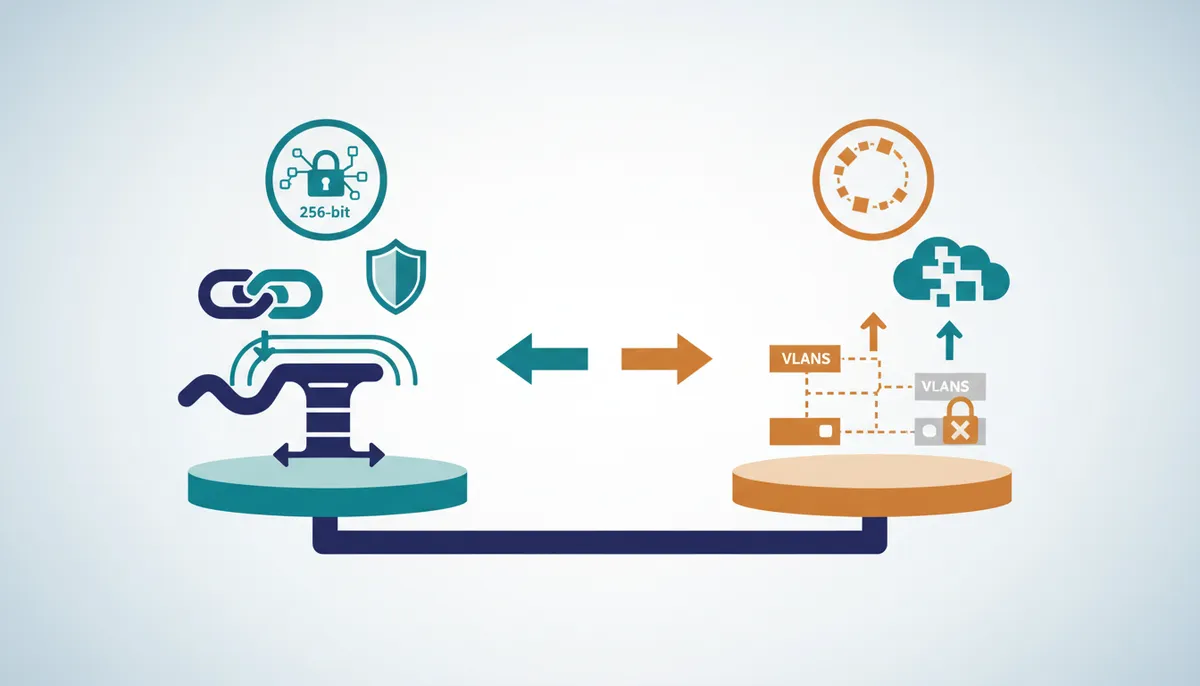
Provider networks assign a secondary eth1 interface with a private IP like 10.0.0.x/24. It is non-routed on the public internet. This architecture trusts the hosting facility's physical perimeter; traffic between instances never touches the public grid. WireGuard takes a different path. It builds a software tunnel over public infrastructure using cryptographic keypairs, not physical segregation. You configure the wg0.conf file, define the Address, set ListenPort to 51820, and specify peer details like PublicKey and AllowedIPs for encrypted comms. This secures data in transit even on untrusted paths.
| Feature | Provider Private Network | WireGuard Tunnel |
|---|---|---|
| Isolation Method | Physical/VLAN segregation | Cryptographic encryption |
| Routing Scope | Limited to provider datacenter | Global via public internet |
| Configuration | Automatic via hypervisor | Manual key and peer setup |
| Dependency | Vendor lock-in required | Software portable |
Provider networks trap you in a single facility. Tunnels extend private connectivity across any geography. The catch? Tunnels add CPU overhead for encryption. Native interfaces avoid this completely. Data sovereignty purists prefer physical separation. Multi-cloud strategies demand portable software tunnels. Your choice depends on whether latency or geography drives your ops.
Deploying WireGuard Tunnels for Inter-VPS Security
Start by running sudo apt install -y wireguard to install the userspace daemon on each instance. This creates an encrypted overlay securing traffic over the public internet, unlike provider networks that rely on physical isolation. Generate keys with wg genkey. Populate /etc/wireguard/wg0.conf with the PrivateKey, Address, and ListenPort 51820. Define peer relationships explicitly using PublicKey and AllowedIPs to restrict access to specific subnets. Enable persistence with systemctl enable --now wg-quick@wg0.
There is a catch. Tunnels depend on public routing. If the primary public interface dies, the private tunnel dies with it. Physical private networks often survive public outages. This tunneling method shines when connecting disparate infrastructure where provider-native linking is impossible. Provider solutions offer zero-latency local switching. WireGuard offers consistent security regardless of geography. The trade-off is CPU usage and reliance on stable public IP addresses for discovery. Weigh automated convenience against the portability and cryptographic guarantees of a manual WireGuard mesh.
Latency and Isolation: Native eth1 vs Encrypted Tunnels
Native eth1 interfaces move database traffic with zero encryption overhead. WireGuard burns CPU cycles for every packet. Connecting mysql or psql instances across trusted racks? Use the direct path of provider private networks. Avoid the latency penalty of crypto operations. This relies on the physical security of the hosting facility. Conversely, WireGuard Private Network configurations encrypt traffic traversing public infrastructure. This is mandatory when physical isolation is impossible. Use settings like AllowedIPs (e.g., 10.0.0.2/32) to restrict tunnel access precisely.
| Feature | Native eth1 | WireGuard Tunnel |
|---|---|---|
| Traffic Path | Internal Switch | Public Internet |
| Encryption | None | Mandatory |
| Latency | Minimal | Increased |
| Isolation | Physical | Logical |
Use native eth1 for intra-datacenter clusters where latency is king. Use WireGuard for cross-region replication or untrusted environments. This distinction ensures optimal resource use without compromising security where it counts.
Operational Best Practices for Email Deliverability and Network Stability
SMTP HELO Identity Alignment with PTR Records

Mail servers reject messages if the SMTP HELO hostname doesn't resolve to the server's reverse DNS entry. Receivers enforce this to filter spam. A mismatched reverse DNS configuration gets your domain email blacklisted, causing immediate delivery failures. Configure your mail server's HELO identity to match the hostname in the PTR record managed by your IP provider. This consistency forms the basis of trust for inbound filters. Even valid messages fail without it. The rule is strict: IP address, PTR record, and HELO string must form a closed loop. Remember, PTR records are set by the IP owner, usually the VPS provider, not your registrar. Configure them in the VPS control panel or via support. Maintain a single source of truth for IP identity to prevent routing and reputation disasters. Prioritize address blocks that support full forward and reverse consistency.
Executing Network Diagnostic Commands for Port and Firewall Validation
Validate reachability first. Run ping -c 5 YOUR_VPS_IP to confirm basic ICMP response. This isolates physical connectivity from app errors. Next, verify specific services with nc -zv YOUR_VPS_IP 443 for HTTPS or port 22 for SSH. These commands give immediate pass/fail status for firewalls and daemons.
Check active sockets with sudo ss -tlnp for TCP or sudo ss -ulnp for UDP. This reveals binding issues. Is the service listening on 0.0.0.0 or a restricted interface? Misaligned bindings cause port not accessible errors even with correct firewall rules. Missing reverse DNS triggers email blacklisted status. Diagnose this by comparing PTR records against forward lookups. Proper Reverse DNS configuration maps the numerical IP back to a domain name, a critical step for mail validation.
| Command | Function | Layer |
|---|---|---|
ping |
Reachability | ICMP |
nc |
Port Status | TCP/UDP |
ss |
Socket State | Kernel |
Third-party tools exist, but unverified configs introduce noise. Skipping validation costs you deliveries and connections. Prioritize precise IP allocation hygiene.
Remediation Checklist for IPv6 Binding and UFW Blocking Errors
Fix outages by verifying dual-stack bindings and firewall precedence. Apps binding only to IPv4 often fail when clients resolve IPv6 first. Execute this sequence:
- Inspect Nginx configs for
listen [::]:443to enable native IPv6. - Disable the stack entirely via
sysctl -w net.ipv6.conf.all.disable_ipv6=1if dual-stack is unnecessary. - Clear UFW blocking errors with
sudo ufw allow PORT/tcpfor required mail ports.
This behavior often mimics a port not accessible state. Correcting local binding errors ensures your public IP allocation functions as intended for secure private connectivity.
About
Evgeny Sevastyanov, Customer Support Team Leader at InterLIR, brings direct operational expertise to VPS networking complexities. Leading the support division at InterLIR, a specialized IPv4 marketplace founded in Berlin, Evgeny manages the technical intricacies of IP allocation daily. His role involves creating objects in RIPE databases and resolving spam listings, making him uniquely qualified to explain critical issues like missing PTR records or DNS propagation delays. At InterLIR, his team ensures clean BGP routes and verified IP reputation for clients across hosting and cybersecurity sectors. This hands-on experience with IPv4 resource management allows him to articulate why proper network configuration is vital for VPS stability. By connecting theoretical networking fundamentals to real-world troubleshooting scenarios encountered in customer support, Evgeny provides actionable insights grounded in the daily reality of maintaining reliable internet infrastructure.
Conclusion
Leasing IPv4 blocks creates a dependency on Time-To-Live (TTL) mechanics that many ignore until maintenance fails. When platforms lease rather than own, your DNS agility becomes the single point of failure. Migrate services without adjusting TTL values, and global cache expiration forces extended downtime, contradicting the flexibility of elastic cloud environments. This oversight isn't just technical debt; it is immediate service unavailability that erodes customer trust.
Treat TTL reduction as mandatory, not optional. Lower your TTL to 300 seconds at least 24 hours before scheduled maintenance. This window lets global resolvers discard stale entries, enabling smooth failover when the underlying VPS IP assignment shifts. Wait less, and you risk partial outages where users hit old endpoints while others hit new ones. Audit your DNS zone files today. Verify that critical records don't retain hour-long caches. Adjusting these values now prevents connectivity gaps when your provider executes backend upgrades.
Frequently Asked Questions
Providers lease blocks to scale capacity without permanent ownership transfers. This approach addresses the global scarcity of available addresses efficiently.
Mail servers will likely reject your emails or send them to spam folders. A missing entry triggers immediate delivery failures for inbound traffic.
You must wait a full 24-hour period for global cache expiration. This ensures all prior DNS records are purged from resolver caches worldwide.
No, CNAME records are invalid when used at the zone apex. You must use an A record for the root domain to function correctly.
IPv6 addresses utilize a 128-bit notation to accommodate future network growth. This contrasts with the 32-bit structure found in IPv4.
References